Why a checklist beats a gut feeling
Homeschool kids often want what every kid wants: friends who share their interests. Online groups can help, especially if you live far from a co-op. Parent guides agree on the basics. There is no 100% safe way to talk to strangers online, but risks drop sharply when a parent picks the space, controls who can get in, and stays involved. Good starting points include Internet Matters, SafeKids.com and Thorn for Parents.
The 10-question checklist
- Who can join? A closed group of verified or paying members is very different from a public sign-up with only an email address.
- Does a parent approve each child? Look for parent accounts that switch a child on, not kids who sign themselves up.
- Can strangers message my child? Direct messages from people your child does not know are a major risk. Prefer spaces without private DMs.
- What can be posted? Photos, video and links carry the most risk. Text-only spaces remove much of it.
- Are kids kept to their own age group? Mixed-age rooms put a nine-year-old in the same space as a seventeen-year-old.
- How is it moderated? Ask whether messages are filtered, whether flagged content is hidden before anyone sees it, and who reviews it.
- Can I see what my child sees? You should be able to read everything your child can read and write.
- Does my child use their real name? Prefer a nickname or character name, and rules against sharing names, phone numbers or locations.
- How do reports work? There should be a simple way for a child to say "tell a grown-up", and a human who responds.
- What happens to the data? Look for short retention, no selling of children's data and clear terms. Children's privacy has its own rules in the US.
Red flags
- Anyone can sign up and message anyone.
- Photo, video or livestream features with no parent controls.
- No clear moderation or contact for reports.
- Pressure to move the conversation to another app.
- Requests for real names, school names, addresses or gift cards.
- Your child becoming secretive or upset after being online. Talk about it calmly and keep the conversation open.
How Lumi Circles measures up
We built Lumi Circles against this same list. Here is how it answers each point, and where its limits are.
| Question | Lumi Circles |
|---|---|
| Who can join | Only active, paying Lumi Academy and Lumi High members (parents). |
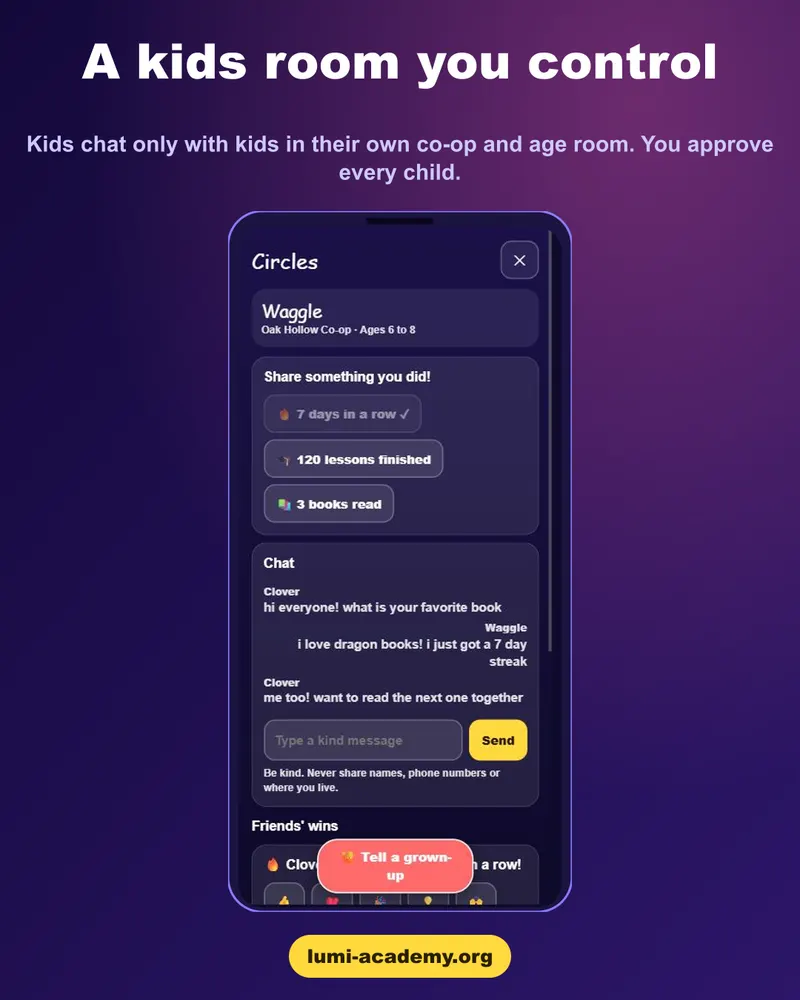
| Parent approval | The kids' room is off until a co-op admin turns it on, then each child must be approved by their own parent. |
| Stranger messaging | No private messages for kids. Kids talk only with kids in their own approved co-op and age room. |
| What can be posted | Text only. No photos, video or links. Kids can also share simple progress cards and preset cheers. |
| Age grouping | Five separate rooms: 6 to 8, 9 to 11, 11 to 13, 14 to 16 and 16 to 18. Older kids never share a room with younger kids. |
| Moderation | Strict word filters. Flagged kids' messages are hidden automatically until a grown-up reviews them. |
| Parent visibility | Parents can read every room and every message. |
| Names | Kids appear as their Lumi Pets pet name, not their real name. |
| Reports | A "Tell a grown-up" button for kids, and reports go to co-op admins and Lumi staff. |
| Limits | Filters are not perfect, and Lumi does not supervise meetups. Parents stay responsible for their children. |
This is Lumi's own description of Lumi Circles. Judge any community, including ours, by checking it against the list above.
See how Circles works
A members-only home for homeschool co-ops, with an optional parent-approved kids' room.
Start the free 48-hour trial →- A members-only community: every adult inside has a paid Lumi account.
- A kids' room that is off by default, approved child by child, with parents able to read everything.
- Lessons, a pet to care for and progress tracking in the same account, so children's time online has a purpose.
Start the free 48-hour trial. Circles opens with a paid Lumi Academy or Lumi High plan; the free 48-hour trial lets you try the lessons first, no card needed.
Frequently asked questions
Is it safe for homeschool kids to chat online?
It can be reasonably safe when a parent chooses the space, controls who can join and stays involved, but no setting is risk-free. Use a checklist, supervise younger children, and keep talking with your child.
What features make an online community safer for kids?
Closed membership, parent approval for each child, no private messages from strangers, text-only posting, age-grouped rooms, filtering and fast human moderation, and full parent visibility.
Should kids use their real names online?
Prefer a nickname or character name, and teach kids never to share their full name, address, school, phone number or photos.
At what age can kids join Lumi Circles' kids' room?
Children ages 6 and up can be approved by a parent. They are placed in an age room by grade (or age if no grade is set).